Showing posts with label install. Show all posts

Thursday, 9 February 2017

Stop Windows 10 automatic updates


For all of us who have been using Windows 10 home edition for a while might know the pain of Automatic updates running in the background every now and then.  This affects our browsing experience  as well as increasing the data usage of the network. 


So here is a quick and neat trick to stop automatic updates on Windows 10 . However this trick only works with WLAN networks and not for networks connected over Ethernet. So if you connect your laptop running Windows 10 via Wi-Fi this might be the solution for you.


  • Go into the network settings
  • Click on 'Manage Known Networks' and find your network. Click on the network to reveal properties.
  • Scroll down to find a switch for 'Metered Connection' and switch it ON.
  • And you're done.


You can use this trick for multiple networks from preventing automatic windows updates . This can be easily reversed if you want the automatic updates option back.  You can also check for updates manually and install them on the metered connection.

So you use this trick to save the precious data that you would rather use for downloading movies and TV Series. :P


Wednesday, 11 May 2016

Backdrops : Wallpapers

Wallpaper App for Big Screens

Backdrops is a bliss for those of us who want the perfect wallpaper. It took quite a while for a beautifully designed app with rich content to show up on the playstore which could do justice to the full HD screens of our devices. 


Backdrop is designed into tabs namely community, explore and favorites. The huge collection of amazing wallpapers are uploaded by users across the globe. You can sign up to submit your photographs as wallpapers too. 


The community and explore tab are refreshed with new wallpapers everyday. You can set any wallpaper from inside the application. However you may only save wallpapers from the community tab. Saving wallpapers to your device from the explore tab requires the pro version.


While most wallpaper apps provide compressed images that appear grainy on the large screens, Backdrops does not shy away from listing wallpapers with size as much as 3-4 mb with exceptional quality, which in turn is required for the full HD screens. 

This application is a must try for people using big screen android device. 

Wednesday, 23 March 2016

What Everyone is Playing - Clash Royale

What everyone is Playing - CLASH ROYALE

The game developers at Supercell are back with an exciting new installment Clash Royale after the massive success of their previous title Clash of Clans. The game is essentially a card combat game where you fight against one enemy with the cards in your deck. It’s a real time strategy game where you would win only by choosing the right cards at the right time. Let’s dig a little deeper to find out why this game has everyone hooked.


THE GAME
The game consists of each player having a selected deck of 8 cards which can be used to attack or defend against the enemy. The cards are unlocked as you move up in the game and by opening different kind of chests earned after winning battles. Each card needs a certain amount of elixir to be deployed into the battlefield, the elixir refills itself during the battle. There are three towers for each player to defend and attack. Destroying the middle one (where the king sits) instantly wins you the battle. There is also a time limit for each battle which might be extended if there is no clear winner. The game matches you to battle against the players all over the world. You can also have friendly matches with your friends from your clan.


THE REWARDS
Your win in each battle is rewarded by a chest that can be silver, gold or magical. These chests have a time gap before they can be opened. Each chests contains gold for buying upgrades for the cards, gems for special perks and cards of new characters. The game also gives you a free chest to open after every 4 hours so that you keep revisiting the game.


THE CHARACTERS
This game borrows a lot of the characters from its predecessor Clash of Clans and introduces some new ones. The characters are in the form of cards which when deployed on the battlefield attack according to their skills. Each character requires a particular amount of elixir to deploy. There are a lot of characters in the game. Each card is also upgraded once you have collected enough cards to move to next level. There are some really cool new characters to be unlocked at every level and you can handpick any of these numerous characters for your deck.


WHY TO PLAY
For starters this game is extremely easy to learn and play, the tutorial in the game makes sure of that. You can run this game on your mobile data and does not require very high speed Wi-Fi network to play. You get free chests and upgrades if you revisit the game and no in app purchases are required. The game has enough to keep you hooked and you can easily move up the game by selecting through unlocked characters and using them in your deck. This is one of those classics game that every one of your friends is playing and you have to give it a try. Believe me you won’t regret it.

Monday, 21 March 2016

Essential Instagram Tricks to know!

Essential Instagram Tricks

Instagram is first of its kind photo sharing social network that has come a long way since its launch in 2010. Starting only with square photo sharing, Instagram has evolved by introducing numerous features and sharing of videos as well as gifs on its platform.

Here are some essential Instagram Tricks that would make the app even more accessible: 


Tap and Hold Camera Button to directly jump to Camera Roll

To be frank there is none of us who use Instagram’s native camera to click those mesmerizing photos that we share, but every time we want to post a photo we click on the camera button at the middle and that annoying camera opens. To skip it, you can just click and hold on that camera button to directly go to your camera roll.


Hold on to a username to directly mention them in comments

If you are a regular Instagramer then you know the pain of replying to the people commenting on your photos by searching them in the comment box, but there is a trick to skip that. Just hold on to any username you want to mention in the comments and it would appear in the comment box. You can then directly reply to them and they will get the notifications. You can also slide to the comment to reveal more options for the users.


 Rearrange and Hide filters according to your need

There are some filters we just love on Instagram. And finding them every time among the list is a pain. To avoid that you can just hold onto any filter and drag to rearrange and hide them as per need. Don’t worry the hidden filters are not going anywhere you can get them back by the manage filters button.


Fix Angle and Perspective of your photos

Sometimes those beautiful photos you click require slight adjustments of angle and perspective. You can do that easily by using the Tools menu in the app and adjust the angle and perspective on your photos. Not only does it help to fix your photos but also enhances it.


Get all your liked photos

How many times has it happened that you want to show your friends that one photo you liked weeks ago on Instagram but just couldn’t find?  Well under the settings menu you’ll find ‘Posts You’ve Liked’ inside which you’ll find all the photos and videos you have liked under one roof.


 Hide sponsored Advertisements

You must have come across the annoying advertisements on Instagram, one can recognize these posts with Sponsored written on the top. They may use cellular data, so if you want to hide these Sponsored ads just click on the ‘Sponsored’ written in blue above the post and select ‘Hide This’. Then it would ask you for a reason to hide it, select any of the reason and the post would be hidden from your feed.


Embed Instagram photos on the web

Like an Instagram photo so much that you want to embed it on your website or blog? You can do that by visiting www.instagram.com  on the web. Select the photo you want to embed and click the three dots below it. You’ll see and option to embed it, from there you can copy the code and embed the photo on your website or blog.


Get Your Website URL below your name

This is an interesting one. Ever wondered how you see website names below usernames on the Instagram feed. That is an excellent way to promote your website or blog. It’s a two step process.
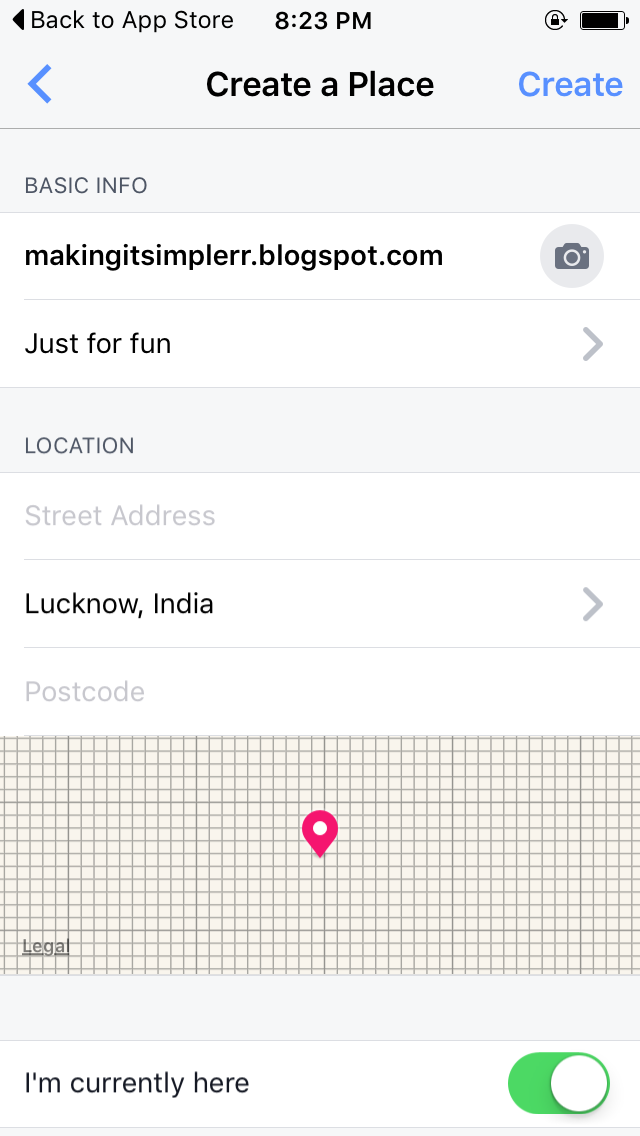
First, go to your mobile Facebook app and click on check in. Write the name of the website you want to promote(You cannot use http). Next click on Add the place to map. After this you will be asked to select a category for the place you are adding, you can just select ‘Just For Fun’. You’ll also be asked to give a location to that place and photo and other info. After giving all the info you want create the Place. Now this place is added to the map of where you are.


Second, now go to your Instagram app and select the photo you want to share and add location to the photo and search for that place and now you can add the URL as a location below your username. Neat, right?


Get a Backup of all your instagram photos

Want to store all your Instagram photos on your Local Disk on the computer? Now you can do that easily by www.instaport.me it’s a website that allows you to sign in with your instagram account and get a backup of the photos you’ve uploaded on Instagram. You can select the photos you want for eg. All the Photos or the Photos between specific dates.


Make Cool gifs with Boomerang

Later last year Instagram launched an app Boomerang to create and share gifs on the Platform. It is easy to use and makes excellent gifs. It helps to create short videos which are then looped to make gifs and then can be shared on Instagram.


PS: These tricks have been tested on iOS and may not work for other platforms.

Follow me on Instagram @nomadhd

Sunday, 1 March 2015

Monitor your Internet Speed on your mobile

Today we spend most of our time on Internet through our smartphones. The developing technology has brought about various advantages to using Internet on the smartohones. But the Internet provider technology is still far behind on the account of speed. How many times have we wondered why the web page is not loading on our android phone browser. Now here is an app that would help us all a lot in monitoring the speed of Internet.

           
So Internet Speed Meter is an app that displays the download and upload speed for WiFi or mobile networks you are currently connected to. The app also helps to track usage on WiFi and mobile network.

You can constantly monitor the data speed by the icon on the top bar of the phone. When you pull down the notification panel it displays the data usage for mobile and WiFi network.

This is a very helpful and light app that can be used with your android phone.. So be sure to give it a try.

Internet Speed Meter

Saturday, 28 February 2015

Best FREE Live Wallpaper : Paperland Live Wallpaper

Customization is the thing we love most about our Android Phones. Among other things live wallpapers are the things that help customize our phones to our liking. Live wallpapers help change to the boring static screens of our phones on to dynamic one. Let's talk about the best live wallpaper we came across in the play store. 
     
Paperland Live wallpaper is a very interesting live wallpaper which puts a scenery on your screen with moving elements. The default theme comes with a scenery with the sun, clouds, road, trees, cars etc that are all moving. You can also adjust the speed of these objects in the settings according to your need. 
    

One of the cool features of paperland live wallpaper is that it adapts to the local weather and changes its scenery accordingly. For example if it's raining the live wallpaper will show thundering clouds and rains and if it's snowing then the live wallpaper will also display snowing.

Paperland live wallpaper is also very battery efficient and does not drain out your battery too much like other wallpapers.

Paperland comes with a default theme. There are many more themes which you can have by buying the pro version of the application from the play store. So if you use live wallpapers to customize your android device do try Paperland Live Wallpaper


Paperland Live Wallpaper

Friday, 27 February 2015

The only FREE Android Launcher you need: :Yahoo Aviate

I have been using Yahoo Aviate for 2 months now and I can conveniently say that it's the best launcher I have used. Yahoo acquired the Aviate Launcher a year before and since then it has evolved much. 


Aviate provides us with everything we need when we need, meaning the launcher changes your app collections and tools that you might need according to the time of the day or your location. For example if you are at home you'll be having entertainment app collection or if you're travelling it's will bring up your travel app collection.

Aviate also auto categorises your apps into categories like social, travel, entertainment etc. And also gives suggestions of apps to add in these categories. You can always chose for which categories you want to be displayed.

Aviate also provides with widgets that can be used like news and weather etc. These widgets can be added and re sized anywhere on the screen. 

For the music lovers as soon as you plug in your headphones the launcher mode changes to listening and you can setup any music app to control the music. It also displays tweets from the artists.

As far as the launchers go this is the best launcher which is absolutely free and light in size. So do download it and give it a try.

Yahoo Aviate

Friday, 20 February 2015

Hike has it all: The awesome new feature!

The Indian instant messaging company has pushed another update with a new feature that has brought just everything you need in a messenger. The already successful instant messaging application which has been a rival to likes of WhatsApp, Viber and Line has now crossed every line to become India's favorite. Lets talk about the new feature which we think would be very successful.


With  the latest update Hike has put in a new contact in everyone's favorite list. This contact is named Natasha. With Natasha hike tries to bring to you information, search results, weather and facts which you otherwise would require to search in a browser straight to your messenger.


How? You ask. Well its simple, you just have to send message to this contact and the contact will immediately respond with appropriate results. For example you need weather updates about a location you just type in #weather Delhi and you get weather update for Delhi, or you want to search a person or article on Wikipedia you just type #wiki Rajnikanth  and you immediately get a response with the result. There is a lot more that you can do. A complete list can be availed by sending #more to this contact.


Hike Messenger[Android][Windows Phone][IOS]

Wednesday, 18 February 2015

Fleksy Android Keyboard: Why we Love it!

Fleksy is a third party Android Keyboard which is now also available for IOS devices. Now most of you use the preinstalled keyboard provided(Google Keyboard or the manufacture keyboard). But they have a limited functionality and are simple. So lets see what makes Fleksy stand out.

Fleksy has a very wide layout that is pleasing to the eye and easy to use. The keyboard can be re-sized to three basic sizes depending upon the size of your screen. But the keyboard layout is such that you need both hands to type in. I find this good as with the large screen phones now I don't see how one can type only with one hand. Also the keyboard does not have the popular swipe feature and that's not a problem for me as I don't use swipe to type phrases.


The feature that makes Fleksy catch the eye is the extensions. Fleksy has a lot of extensions to add to the keyboard like the number row above the keyboard, shortcuts to apps and hot-keys etc. You can add up to three extensions to your keyboard according to your liking. And let me tell you these extensions work like a charm.


Although one of the feature that still lags behind is the language support. Fleksy has only basic language support and languages like Urdu and Hindi are still under development.

High on features the keyboard is also high on price. There is a limited trial and a limited number of themes and extensions that can be used. For all other things you'll have to pay. You can always just buy the keyboard and use the basic themes and extensions which are enough if you ask me. That said I have been using this keyboard since last six months and it hasn't disappointed.

Fleksy[Android][IOS]

Tell us which third party keyboards do you use on your device.

Saturday, 19 April 2014

Windows Phone 8.1 : Microsoft has finally done it!

Windows Phone 8.1 : Developers Preview( For everyone! )


Earlier this week on Monday Microsoft released its Windows Phone 8.1 Developers Preview. This was the answer to all the critics to the Windows Phone who complaint about things like a notification center, moving apps to SD card and lack of customization. 

You must all be very curious to try your hands on this new Developers release. Well, not going by its name the Developer Preview of the Windows Phone 8.1 is almost for everybody who can follow some easy steps. Lets begin. 


Step 1:

Click on this and sign in using the Microsoft account running on your Windows Phone 8 device. Then get your self registered by accepting the terms.

Step 2:

On your device download and install Preview For Developers App by Microsoft. You can also download the app from here. ( Also make sure that your device is running the GDR3 update or Lumia Black)

Step 3:

Now start the app and accept the terms. Sign into your Microsoft account and Enable Preview for Developers. 


Step 4:

Go check Phone Updates in settings you will find updates for your phone. There will be two updates first one is a small one and it helps the phone to install the larger update. The small update is of 5-10mb and the larger update is of  400-500mb. 


If you encounter any problem or have any queries leave it in the comments below.