Essential Instagram Tricks
Instagram is first of its kind photo sharing
social network that has come a long way since its launch in 2010. Starting only with square photo sharing, Instagram has evolved by introducing numerous features and sharing of videos as well as gifs on its platform.
Here are some essential Instagram Tricks that would make the app even more accessible:
Tap and Hold Camera Button to directly jump to
Camera Roll
To be frank there
is none of us who use Instagram’s native camera to click those mesmerizing
photos that we share, but every time we want to post a photo we click on the
camera button at the middle and that annoying camera opens. To skip it, you can
just click and hold on that camera button to directly go to your camera roll.
Hold on to a username to directly mention them in
comments
If you are a
regular Instagramer then you know the pain of replying to the people commenting
on your photos by searching them in the comment box, but there is a trick to
skip that. Just hold on to any username you want to mention in the comments and
it would appear in the comment box. You can then directly reply to them and
they will get the notifications. You can also slide to the comment to reveal
more options for the users.
Rearrange and Hide filters according to your need
There are some
filters we just love on Instagram. And finding them every time among the list
is a pain. To avoid that you can just hold onto any filter and drag to
rearrange and hide them as per need. Don’t worry the hidden filters are not
going anywhere you can get them back by the manage filters button.
Fix Angle and Perspective of your photos
Sometimes those
beautiful photos you click require slight adjustments of angle and perspective.
You can do that easily by using the Tools menu in the app and adjust the angle
and perspective on your photos. Not only does it help to fix your photos but
also enhances it.
Get all your liked photos
How many times has
it happened that you want to show your friends that one photo you liked weeks
ago on Instagram but just couldn’t find?
Well under the settings menu you’ll find ‘Posts You’ve Liked’ inside
which you’ll find all the photos and videos you have liked under one roof.
Hide sponsored Advertisements
You must have come
across the annoying advertisements on Instagram, one can recognize these posts
with Sponsored written on the top. They may use cellular data, so if you want
to hide these Sponsored ads just click on the ‘Sponsored’ written in blue above
the post and select ‘Hide This’. Then it would ask you for a reason to hide it,
select any of the reason and the post would be hidden from your feed.
Embed Instagram photos on the web
Like an Instagram
photo so much that you want to embed it on your website or blog? You can do
that by visiting www.instagram.com on the web. Select the photo you want to embed
and click the three dots below it. You’ll see and option to embed it, from
there you can copy the code and embed the photo on your website or blog.
Get Your Website URL below your name
This is an
interesting one. Ever wondered how you see website names below usernames on the
Instagram feed. That is an excellent way to promote your website or blog. It’s
a two step process.
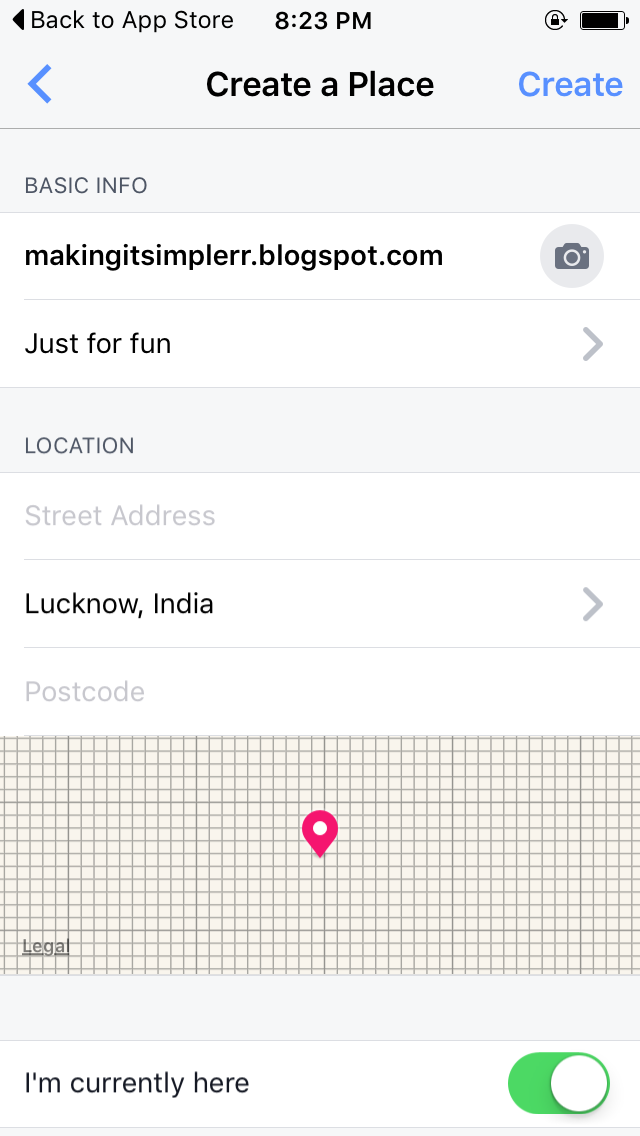
First, go to your
mobile Facebook app and click on check in. Write the name of the website you
want to promote(You cannot use http). Next click on Add the place to map. After
this you will be asked to select a category for the place you are adding, you
can just select ‘Just For Fun’. You’ll also be asked to give a location to that
place and photo and other info. After giving all the info you want create the
Place. Now this place is added to the map of where you are.
Second, now go to
your Instagram app and select the photo you want to share and add location to
the photo and search for that place and now you can add the URL as a location
below your username. Neat, right?
Get a Backup of all your instagram photos
Want to store all
your Instagram photos on your Local Disk on the computer? Now you can do that
easily by www.instaport.me it’s a
website that allows you to sign in with your instagram account and get a backup
of the photos you’ve uploaded on Instagram. You can select the photos you want
for eg. All the Photos or the Photos between specific dates.
Make Cool gifs with Boomerang
Later last year
Instagram launched an app Boomerang to create and share gifs on the Platform.
It is easy to use and makes excellent gifs. It helps to create short videos
which are then looped to make gifs and then can be shared on Instagram.
PS: These tricks have been tested on iOS and may not work for other platforms.
Follow me on Instagram @nomadhd